Building D3 chart requires width and height values upfront, this helps D3 to map data points to an x, y coordinate on the SVG canvas. In this post we’re creating a simple line chart with x-axis and y-axis and it resizes when the browser window is resized and axes ticks are updated based on the available width and height.
First, we need a way to get width and height values and it should update when the browser window is resized. For this, I’m creating a custom resize hook called useResize, which returns the size of HTML element passed to it.
Once we have this in place, implementing a line chart is straight forward. However to make the axes responsive, i.e. change its tick based on the available size. Pass a ratio based on width or height to the ticks method of both axes.
1 2 3 4 5 6 7 8 9 10
const { width, height } = size;
const xAxis = d3 .axisBottom() .scale(xScale) .ticks(width / 100); // I've hard coded 100 here, you can change it based on the no:of ticks required const yAxis = d3 .axisLeft() .scale(yScale) .ticks(height / 50); // I've hard coded 50 here, you can change it based on the no:of ticks required
Here is the full working demo running in CodeSandbox
I started learning Elixir recently, while working on a personal project I had to pattern match between struct and map in a function. While glancing through the documentation I came across a function is_map, as the name suggests it check if the argument is map or not. Coming from a C# background I thought it is going to work, but it didn’t.
In Elixir struct is a special kind of map, so is_map function matches both. Then I went through some of the open source code bases and came across a way to do this(don’t remember from which project I saw this)
1 2 3 4 5 6 7 8 9
# This match struct defclean_up(data = %_{}) do ..... end
# This match map defclean_up(data = %{}) do .... end
Very powerful pattern matching technique and elegant solution. Here if data is a struct it matches first function and if it is map matches the second one.
I started learning Elixir recently, while working on a personal project I had to pattern match between struct and map in a function. While glancing through the documentation I came across a function is_map, as the name suggests it check if the argument is map or not. Coming from a C# background I thought it is going to work, but it didn’t.
In Elixir struct is a special kind of map, so is_map function matches both. Then I went through some of the open source code bases and came across a way to do this(don’t remember from which project I saw this)
1 2 3 4 5 6 7 8 9
# This match struct defclean_up(data = %_{}) do ..... end
# This match map defclean_up(data = %{}) do .... end
Very powerful pattern matching technique and elegant solution. Here if data is a struct it matches first function and if it is map matches the second one.
Writing parser from scratch is a tedious task. Recently I came across a simple parser generator for JavaScript called PEG.js
PEG.js is a simple parser generator for JavaScript that produces fast parsers with excellent error reporting. You can use it to process complex data or computer languages and build transformers, interpreters, compilers and other tools easily.
In order to create a parser, provide a grammar as the input and PEG.js will build a parser for that grammar. Then that generated parser can be used to parse the content.
Take a simple example for writing grammar which will parse texts like “$100”, “$150” etc…
Example text follow a pattern where currency symbol i.e. “$” is followed by a number. Translating this into pEG.js grammar looks like this
1 2 3 4 5 6 7 8
Text = "$" Number
Number = Digit+
Digit = [0-9]
Every grammar has set of rules, in this case we have three rules. Every rule has a name that identify the rule and a parsing expression. Rule name is followed by “=” then parsing expression.
Rule Text Parsing expression for this rule is *”$” Number. This parsing expression says “Match text that has literal “$” followed by a *Number“. Note Number is name of a rule.
Rule Number Parsing expression “Digit+” means - match text that has one or more Digit.
Rule Digit Last rule says match any character that is between 0 to 9
Hope you got basic idea how a grammar is created. PEG.js provides playground where you can try your grammar and see how it is working. To try this go to http://pegjs.org/online and copy paste the grammar we have created on text box 1 and enter “$100” on text box 2. Parsed result will be shown on the output section and it looks like this
1 2 3 4 5 6 7 8
[ "$", [ "1", "0", "0" ] ]
PEG.js was able to parse successfully, if you provide an invalid input like “$100$” it will show a parser error.
Note if you want to just get the value from that text (“100” from “$100”), the output that we got is not that useful. In order extract only the required values, parsing expression allows to write custom JavaScript expressions inside the curly braces (“{“ and “}”). Updating ruleText like below will return just the value “100”
1 2 3
Text = "$" n:Number { return n.join(""); }
Two changes we have made to the previous rule
n:number - added a prefix n to ruleNumber Here we are assigning the match result of ruleNumber to a variable called n
{ return n.join(""); } JavaScript statement inside the curly brace call join method on the variable n. In this case variable n contains an array of characters, so calling join on that will concatenate and produce a string which returned as the result of ruleText
##Parsing Grocery List Take some more complex example where you want to parse grocery list and return the result in a JSON format like below where quantity should be in grams
Grocery list text will be in the following format - where the quantity can be in kg or gm
1 2 3
Onion 1kg Tomatoes 500gm Beans 1kg
Please try for yourself and share your grammar.
Here is the grammar I have created to do this; Below JsFiddle is interactive you can change grammar and grocery list, clicking on Parse button will show the result.
Hope this article was helpful. Please share your thoughts and comments.
Writing parser from scratch is a tedious task. Recently I came across a simple parser generator for JavaScript called PEG.js
PEG.js is a simple parser generator for JavaScript that produces fast parsers with excellent error reporting. You can use it to process complex data or computer languages and build transformers, interpreters, compilers and other tools easily.
In order to create a parser, provide a grammar as the input and PEG.js will build a parser for that grammar. Then that generated parser can be used to parse the content.
Take a simple example for writing grammar which will parse texts like “$100”, “$150” etc…
Example text follow a pattern where currency symbol i.e. “$” is followed by a number. Translating this into pEG.js grammar looks like this
1 2 3 4 5 6 7 8
Text = "$" Number
Number = Digit+
Digit = [0-9]
Every grammar has set of rules, in this case we have three rules. Every rule has a name that identify the rule and a parsing expression. Rule name is followed by “=” then parsing expression.
Rule Text Parsing expression for this rule is *”$” Number. This parsing expression says “Match text that has literal “$” followed by a *Number“. Note Number is name of a rule.
Rule Number Parsing expression “Digit+” means - match text that has one or more Digit.
Rule Digit Last rule says match any character that is between 0 to 9
Hope you got basic idea how a grammar is created. PEG.js provides playground where you can try your grammar and see how it is working. To try this go to http://pegjs.org/online and copy paste the grammar we have created on text box 1 and enter “$100” on text box 2. Parsed result will be shown on the output section and it looks like this
1 2 3 4 5 6 7 8
[ "$", [ "1", "0", "0" ] ]
PEG.js was able to parse successfully, if you provide an invalid input like “$100$” it will show a parser error.
Note if you want to just get the value from that text (“100” from “$100”), the output that we got is not that useful. In order extract only the required values, parsing expression allows to write custom JavaScript expressions inside the curly braces (“{“ and “}”). Updating ruleText like below will return just the value “100”
1 2 3
Text = "$" n:Number { return n.join(""); }
Two changes we have made to the previous rule
n:number - added a prefix n to ruleNumber Here we are assigning the match result of ruleNumber to a variable called n
{ return n.join(""); } JavaScript statement inside the curly brace call join method on the variable n. In this case variable n contains an array of characters, so calling join on that will concatenate and produce a string which returned as the result of ruleText
##Parsing Grocery List Take some more complex example where you want to parse grocery list and return the result in a JSON format like below where quantity should be in grams
Grocery list text will be in the following format - where the quantity can be in kg or gm
1 2 3
Onion 1kg Tomatoes 500gm Beans 1kg
Please try for yourself and share your grammar.
Here is the grammar I have created to do this; Below JsFiddle is interactive you can change grammar and grocery list, clicking on Parse button will show the result.
Hope this article was helpful. Please share your thoughts and comments.
New JavaScript SPA(Single Page Application) frameworks are getting written day by day, generally one core feature these frameworks solves is how to organizing the code so that maintaining it in the future won’t be a night mare. When it comes to organizing JavaScripts in a large scale server side application, resources available is very less SPA frameworks.
Organizing JavaScripts in a server side application is entirely different from SPA, most of the articles that I came across is suggesting to include page level script inside the server side page itself - e.g. in ASP.Net MVC you include common JavaScript files inside the layout file and views will include the scripts it required
For large applications a page will have different components which requires it’s own set of JavaScript files in order work. Including and organizing these component level scripts and it’s dependencies can cause lot of issues.
So here I want explain a different approach which I am not going to claim is best optimal solution for all applications but I think it does work for majority of the applications.
##Application Class Application is a TypeScript class which is the main entry point to client side script, this class is responsible for initializing page component. This is done by reading data-js-component attribute on body, then import the component dynamically and initialize.
In order to load the component dynamically I am using a module loader called SystemJS, line 15 shows dynamically importing a page component. Once the component is imported it’s initialize() method is called after creating an instance of that component. One of the main advantage of using a module loader here is it will manage the dependencies which means any dependent modules will be imported automatically.
Every page will have a corresponding page component, name of this page level component is set as a data-js-component attribute on the body tag. Page component name is generated based on a convention - it will be same as the controller name. e.g. component name for CustomerController will be Customer. All page level components resides in a separate directory called Pages.
I have created a Html helper extension method which will return controller name, it also provide flexibility where an action method could change the page component name using a view data jsComponent.
publicstatic MvcHtmlString JsPage(this HtmlHelper helper) { var pageNameViewData = helper.ViewContext.ViewData["JsComponent"]; var pageName = pageNameViewData != null ? pageNameViewData.ToString() : helper.ViewContext.RouteData.GetRequiredString("controller");
returnnew MvcHtmlString(pageName); }
##Component All page level components derive from a base class Component, this base class implements the core initialization logic. Component can have child components as well, so initializing parent component will initialize child components as well. When Application class initializes page component, then any child components will also get initialized. OnReady method on the component is called after initialization is completed.
Component is associated with an HTML element on which the component is going to act up on. This container element is passed as a constructor argument. Page level component is initialized with body as associated element.
##Child Components A page will have many child components as well. To create these child component element associated with that component should have a data-js-component attribute.
Below code shows Popover component which initializes the bootstrap popover
In order apply this in the razor view, I will be setting data-js-component attribute like below
1 2 3 4 5
<ahref="#" class="btn btn-primary btn-lg js-component" data-js-component="Popover"> Learn more » </a>
##Connecting the dots Finally to wire up everything - Application class needs to initialized. For that import Application module in _Layout.cshtml and initialize it.
Sometimes things are too obvious but don’t work the way we think.
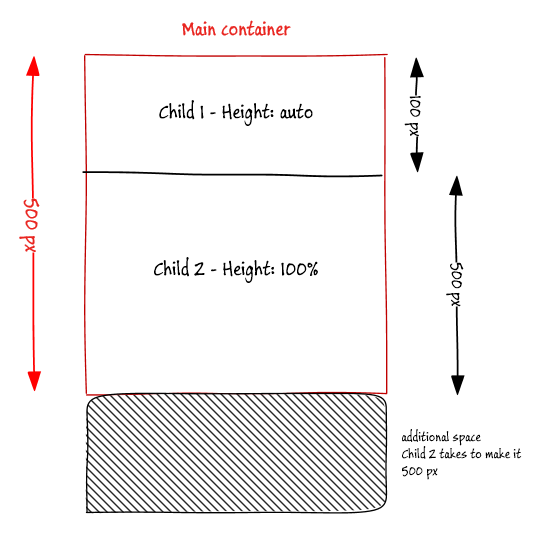
This is the HTML I have, my requirement is child1 height will be auto(based on the content) and child2 will occupy the remaining height of the main-container.
This produces a wrong result - if child1 takes 100px and I expected child2 to be 400px, but the child2 height is 500px.
Let’s see how to solve this problem.
Using Flexbox
Very easy to solve this using flexbox (display:flex), most of the latest browsers supports it. Make container a Flexbox with the direction set to column, then allow child2 to grow using flex-grow:1. This ensure second child height is automatically adjusted.
Gulp is build automation tool which runs on top of Node. In my current project I had to execute set of tasks in a predefined order, in which some of the tasks can be run in parallel to improve the efficiency.
By default Gulp runs all the tasks at the same time, so after googling I saw this official article. In this approach every task will takes a callback function so that Gulp knows when that task is completed. Then other task add this as a dependency
E.g. from the official article
1 2 3 4 5 6 7 8 9 10 11 12 13 14 15 16
var gulp = require('gulp');
// takes in a callback so the engine knows when it'll be done gulp.task('one', function(cb) { // do stuff -- async or otherwise // if err is not null and not undefined, the orchestration will stop, and 'two' will not run cb(err); });
// identifies a dependent task must be complete before this one begins gulp.task('two', ['one'], function() { // task 'one' is done now });
Here task two is depends on task one, so Gulp ensures that task one is completed before running task two.One drawback with this approach is tasks are tightly coupled to each other which reduces the flexibility if you want to change the order.
So I came across a plugin called run-sequence, this plugin allows you to order the tasks much easy. We can re-write the first example like this
1 2 3 4 5 6 7 8 9 10 11 12 13 14 15 16 17 18
var gulp = require('gulp'), runSequence = require('run-sequence');
gulp.task('one', function() { // Returning the stream is improtant return gulp.src(....) .pipe(gulp.dest(....); });
gulp.task('two',function() { // Returning the stream is improtant return gulp.src(....) .pipe(gulp.dest(....); });
The above one ensures that task-1 and task-2 will be running in series, after that task-3, task-4, task-5 will run in parallel, then task-7 and task-8 are run in parallel as well.
Main advantage I see when compared to official documentation is - tasks are independent and orchestration is done by someone else.
Gulp is build automation tool which runs on top of Node. In my current project I had to execute set of tasks in a predefined order, in which some of the tasks can be run in parallel to improve the efficiency.
By default Gulp runs all the tasks at the same time, so after googling I saw this official article. In this approach every task will takes a callback function so that Gulp knows when that task is completed. Then other task add this as a dependency
E.g. from the official article
1 2 3 4 5 6 7 8 9 10 11 12 13 14 15 16
var gulp = require('gulp');
// takes in a callback so the engine knows when it'll be done gulp.task('one', function(cb) { // do stuff -- async or otherwise // if err is not null and not undefined, the orchestration will stop, and 'two' will not run cb(err); });
// identifies a dependent task must be complete before this one begins gulp.task('two', ['one'], function() { // task 'one' is done now });
Here task two is depends on task one, so Gulp ensures that task one is completed before running task two.One drawback with this approach is tasks are tightly coupled to each other which reduces the flexibility if you want to change the order.
So I came across a plugin called run-sequence, this plugin allows you to order the tasks much easy. We can re-write the first example like this
1 2 3 4 5 6 7 8 9 10 11 12 13 14 15 16 17 18
var gulp = require('gulp'), runSequence = require('run-sequence');
gulp.task('one', function() { // Returning the stream is improtant return gulp.src(....) .pipe(gulp.dest(....); });
gulp.task('two',function() { // Returning the stream is improtant return gulp.src(....) .pipe(gulp.dest(....); });
The above one ensures that task-1 and task-2 will be running in series, after that task-3, task-4, task-5 will run in parallel, then task-7 and task-8 are run in parallel as well.
Main advantage I see when compared to official documentation is - tasks are independent and orchestration is done by someone else.
What this piece of code does is, whenever an error occurs that stack trace is send to the server using an AJAX request. This will works great for most of the scenarios but….
Consider a situation where an error occurs inside a mouse move event handler. Then you will be trying to sending hundreds of requests to server in short interval. This can bring down your server if not handled properly, it’s like DDOS-ing your own server.
Good approach will be to control the rate at which errors are send to the server for logging. This can be done using a concept called Throttling - which ensures that the target method is never called more frequently than the specified period of time.
Google for JavaScript Throttling you can find lot different implementations. EmberJS also provide it’s own throttling function Ember.run.throttle
Here is the example from the official EmberJS website
1 2 3 4 5
var myFunc = function() { console.log(this.name + ' ran.'); };
var myContext = {name: 'throttle'};

Ember.run.throttle(myContext, myFunc, 150);
// myFunc is invoked with context myContext